Integration with Application Logs
To integrate application logs with Datadog:
- Login to AWS console.
- Navigate to the CloudFormation-StackPage.
The main stack with nested stacks will be shown as in Figure-7.

- Identify and click the ‘ForwarderStack’ in the Stacks window.
- The StackInfo and other tabs will be displayed in the right pane.
- Click on the ‘Resources’ tab.
A resource with the name Forwarder will be seen as shown in Figure-8.

This Forwarder is an AWS Lambda function which forwards the application logs from
CloudWatch to Datadog.
Click on the url in the Physical ID column of Forwarder with Type - AWS:Lambda:Function.
You will be taken to the Lambda page where you can add triggers against many AWS resources. This is shown in Figure-9.
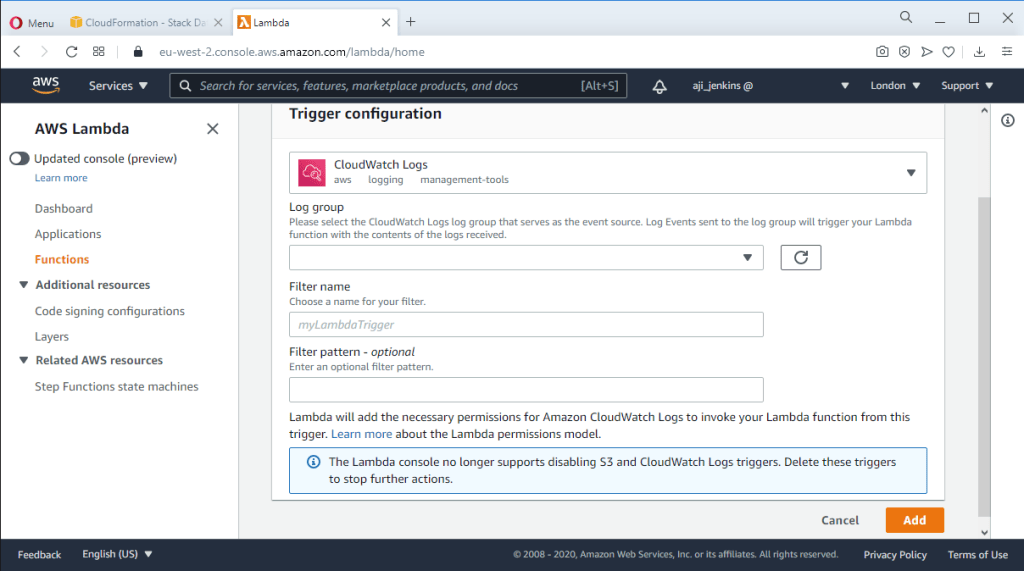
- Click on ‘Add Trigger’ button.
- Select ‘CloudWatch Logs’ from the select box.
- Select the log group from the ‘Log group’ select box.
- Provide a filter name .
- Give a filter pattern if you prefer.
- Click the ‘Add’ button.
This completes the integration of CloudWatch Logs with Data dog. The ‘Trigger Configuration’ page is shown in Figure-10.

Leave a Reply